
| K3 Com
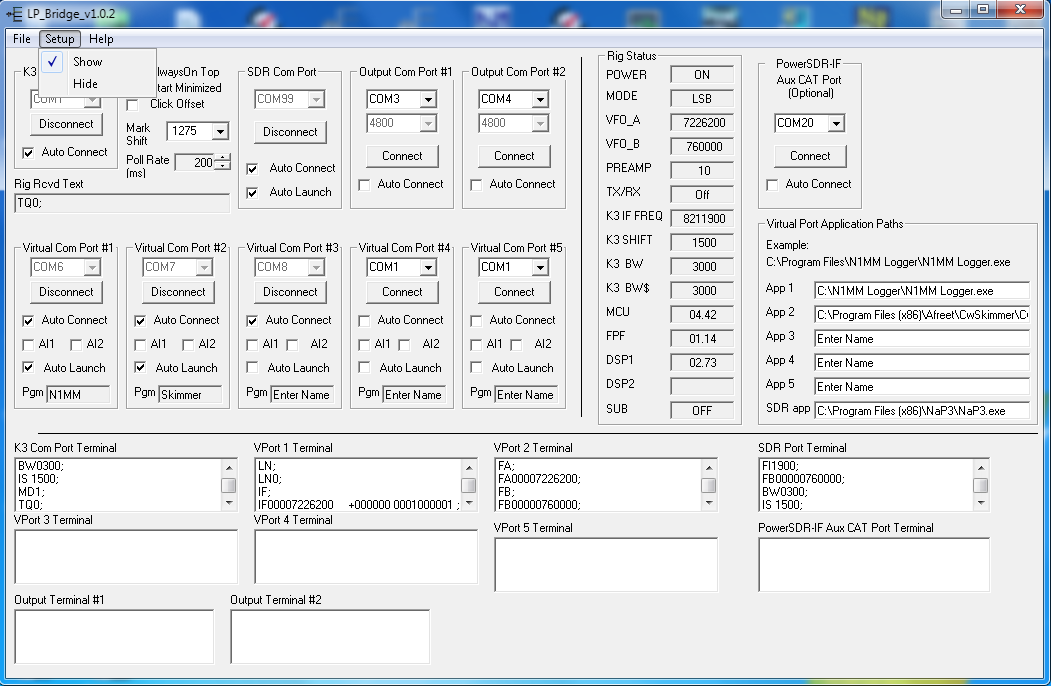
Port... Com Port selector: Use this to select the com port that the K3 is connected to. Connect/Disconnect: Click this button to connect to the K3. When it connects, the button changes to a Disconnect button. The K3 must be set for 38400 baud. The K3 must be connected before any of the virtual ports can be created. Auto Connect: Once everything is working well, the rig connection can be automated to connect when LP-Bridge starts. Always In Top: Check the box to force LP-Bridge to cover all other apps on your desktop. Start Minimized: Check the box to force LP-Bridge to start minimized to the taskbar to reduce desktop clutter. Click Offset: Used with TRX-Pan to cause the VFO frequency sent to the program to be offset to center digital modes midway between mark and space in the passband. Mark Shift: Used with TRX-Pan to allow the program to properly display the passband overlay in digital modes. Poll Rate: Sets the rate of polling the K3. SHould not be set less than 200ms unless you have a real serial port. Polling in the SDR app should be set approx. 100ms slower than this setting for best results. |
 |
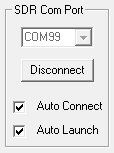
| SDR Com Port... Com Port selector: Select an unused port number to create a virtual port for the SDR app (NaP3 or PowerSDR/IF) to connect to. Auto Launch: Once everything is working well, launching of the SDR app can be automated when LP-Bridge starts. The SDR app path is entered in the expanded setup page, described later. Connect/Disconnect: Click this button to create the port. Auto Connect: Once everything is working well, the SDR connection can be automated to connect when LP-Bridge starts.The K3 must be connected before any of the virtual ports can be created. |
 |
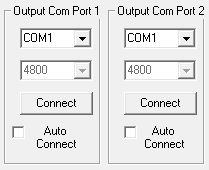
| OutPut Com Ports... Com Port selector: Select the port that your external hardware is connected to (SteppIR controller, amplifier, autotuner, etc.) Baud Rate: Currently fixed at 4800 baud, not adjustable. Connect/Disconnect: Click this button to connect to the hardware. Auto Connect: Once everything is working well, the hardware connection can be automated to connect when LP-Bridge starts.The K3 must be connected before the output ports can be conected. To connect an Output port to SteppIR controller, you need to connect the selected PC port to your SteppIR box Data In port. The cable to the SteppIR controller should be a DB9 female to DB9 female crossover cable. This means that pin 2 from one end should be wired to pin 3 three of the other end and vice versa. The connector on the SteppIR box uses non-standard wiring, so only wire the needed pins. Pin 2 on the SteppIR end goes to pin 3 on the computer end... pin 5 (gnd) is the same at both ends. Also, it is necessary to add a "loopback" jumper from pin 7 to pin 9 at the SteppIR end of the cable. Here is a crude diagram... |
  |
| Virtual Com Ports... Com Port selector: Select an unused port number to create a virtual port for any application (logger, CW SKimmer, PSK app, etc.) The app is set up to connect to a K3 on this port. Any baud rate is acceptable since this port adjusts automatically. Connect/Disconnect: Click this button to create the port. Auto Connect: Once everything is working well, the app port can be automatically created when LP-Bridge starts.The K3 must be connected before any of the virtual ports can be created. AI1 , AI2: Forces the port to emulate Auto Information modes used by some rigs and required for some apps which don't poll for data. Auto Launch: Once everything is working well, the app associated with the virtual port can be automatically launched when LP-Bridge starts. The program file path is entered in the expanded setup page, described later. Pgm: Scratch pad used to enter the name of the app to help the user keep things straight |
 |
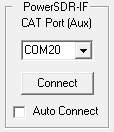
| PowerSDR-IF
Aux CAT Port... Com Port selector: Select an unused port number to create a virtual port to add support for a automatic preamp and split linking. This is optional, and ,ost users consider it too complicated and not worth the effort to set up. It was added to address some requests by a number of users. Connect/Disconnect: Click this button to create the port. Auto Connect: Once everything is working well, this Aux SDR connection can be automated to connect when LP-Bridge starts.The K3 must be connected before any of the virtual ports can be created. |
 |
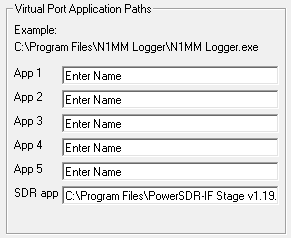
| Virtual
Port Application Paths... Use this section to provide paths to all the apps which you want to auto launch, including the SDR app. |
 |
| Version |
Release
Date |
Notes |
| 1.10 update |
12-9-15 |
Bug fix for OM command on NaP3 port |
| 1.10 full |
12-9-15 |
Bug fix for OM command on NaP3 port |
| 1.09 full |
2-8-15 |
Updated Eltima
drivers to latest ones. |
| 1.08 update |
3-2-13 |
Added support for
NaP3 v2.15 |
| 1.07 full |
1-16-13 |
Added support for
Windows 8 |
| 1.05 |
5-6-12 |
Added changes for NaP3 v1.20 |
| 1.04.1 |
3-1-12 |
Fixed frequency reporting bug |
| 1.04 |
2-28-12 |
Added support for NaP3 v1.1.0 |
| 1.03 |
2-2-12 |
Fixed "IF;" bug with DX Labs |
| 1.02 |
1-1-12 |
Made some slight changes to the GUI, added
LN command and fixed a bug. |
| 1.01 |
12-20-11 |
Added support for NaP3 v1.04 |
| 1.00 |
12-3-11 |
Added support for NaP3 beta 3 |
| 0.9994 |
11-6-11 |
Added support for SMH command |
| 0.9992 |
9-19-11 |
Added support for NaP3 |
| 0.9991 |
7-7-11 |
Updated bargraph command support for K3 to
keep in step with FW v4.39 changes |
| 0.9990 |
4-7-11 |
Added DDE interface for TRX-Pan mousewheel
tuning and faster passband indicator response |
| 0.9989 |
3-2-11 |
Added a check for K3 Diversity mode |
| 0.9988 |
2-13-11 |
Improved polling for VFO B |
| 0.9987 |
2-8-11 |
Add improved Data sub-mode support for K3
/ TRX-Pan. |
| 0.9986 |
2-1-11 |
Add support for additional TRX-Pan
functions (Sub, CW pitch, dualPB, sync AM) |
| 0.9985 |
1-15-11 |
Add support for TRX-Pan |
| 0.9984 |
12-10-10 |
Add
VFO updating of Output Ports when Split is invoked |
| 0.9981 update |
4-12-10 |
Pulled due to rig
control bug. |
| 0.9981 update |
4-10-10 |
Adds
support for K3 Memory Editor |
| 0.9980 full |
4-10-10 |
Bug
fix for Win 7 config.ini path in installer |
| 0.9980 update |
4-7-10 |
Adds support for PowerSDR-IF v1.19.35 |
| 0.9976 full & update |
10-5-09 |
Fixed
problem with IF command that prevented proper reporting of K3 Data
Sub-Modes |
| 0.9974 |
10-3-09 |
Extensive
changes to add all known K3 commands, and change behavior of SET
command pass-throughs |
| 0.9973 |
8-31-09 |
Improved
AI1 operation |
| 0.9972 |
8-25-09 |
Improved
AI2 operation |
| 0.997 |
8-24-09 |
Fixed
bugs with AI1 and AI2 |
| 0.996 |
8-23-09 |
New
version for PowerSDR-IF v1.19.02 |
| 0.994 |
3-20-09 |
Bug Fixes for PowerSDR-IQ v1.12.20 - Last
version for PowerSDR-IQ |
| 0.992 |
3-15-09 |
Adds
support for PowerSDR-IQ v1.12.20 |
| 0.989 |
3-5-09 |
Enabled virtual ports 4 & 5 |
| 0.988 |
3-2-09 |
Added AutoLaunch path entry field for
PowerSDR Added AutoLaunch option for 2nd instance of PowerSDR |
| 0.987 |
3-1-09 | Autostart
enabled for all real and virtual ports. Autolaunch added for virtual port connected apps Autolaunch added for PowerSDR LP-Bridge "start minimized" option added |
| 0.986 |
2-18-09 |
Added support for some special modes for
N1MM |
| 0.985 |
2-1-09 |
Fixed DXBase not working on VPorts 2 &
3 |
| 0.984 |
1-31-09 |
Fixed timing problems with DXBase Fixed truncated frequencies above 99,999.999 MHz. Fixed frequency reporting on the Output ports in Split mode. |
| 0.983 |
10-31-08 |
Adds support for K3 firmware release 2.46 Adds support for HRD 4.1 Build 1989 Adds IF; and FB; outputs for the two Output Ports to support microHam band decoder |
| 0.982 |
9-25-08 |
Fixed bug in Split mode for two Output
Ports |
| 0.981 |
9-11-08 |
Fixed bug that caused Output Port 2 to
recall the com port number for Output port 1. |
| 0.980 |
9-7-08 |
1. Fixed a bug where the position lines in
config.ini were not being saved under certain conditions. 2. Changed the way ports are saved to eliminate the possibility of the wrong port being recalled 3. Fixed RX command problem. |
| 0.979 |
8-15-08 |
Added output ports for SteppIR and other
hardware. |
| 0.978 |
08-07-08 |
Made a change to correct for an apparent
intermittent K3 bug causing errors when polling a VPort for commands
which use the K3 extended command set. |
| 0.977 |
08-05-08 |
1. Changed polling in TX mode to reduce
load on K3 which was causing problems with ALC algorithm in K3. 2. Added AI2 option for VPorts 2 & 3 3. Added error trapping and message for K3 port connection. 4. Fixed a couple minor bugs. |
| 0.976 |
08-03-08 |
1. Fixed a problem with microHam
Router and the way it and at least one other USB to serial adapter
handled AI2 generated responses from the K3. 2. Re-enabled blocking of AI commands from V Ports |
| 0.975 |
08-01-08 |
1.
Fixed a problem with buffer
overrun on microHam Router and other USB to serial adapters when
polling for all the data to initially populate the virtual K3
parameters in LP-Bridge. 2. Fixed bug where polling was being unibtentionally be repeated twice each polling interval. |
| 0.974 |
07-30-08 |
Initial alpha release of LP-Bridge |